
Qwen-Image Edit Plus
Supports multiple image inputs and outputs, allowing for precise modification of text within images, addition, deletion, or movement of objects, alteration of subject actions, transfer of image styles, and enhancement of image details.
What it does
Qwen-Image Edit Plus, in practice.
An advanced image editing model from Alibaba Cloud, offering precise control and high-quality results. Qwen-Image Edit Plus supports multi-image input and output, enabling complex tasks such as precise text modification, object addition/deletion/movement, action change, style transfer, and detail enhancement.
- Purpose: Perform precise image edits using text instructions.
- Core Capability: Supports single-image editing and multi-image blending.
- Foundation: Powered by Alibaba's advanced multi-modal generative AI technology.
- Typical Output: High-quality edited images (1-6 per request) that seamlessly blend changes with the original content.
- Use Cases: E-commerce product photography, professional photo retouching, creative design adjustments, and marketing asset generation.
- Multi-image Blending:
Run Qwen-Image Edit Plus
from $0.032/imageParameters
What you can set.
| Parameter | What it does | Options |
|---|---|---|
images | List of URLs of input images (1-3 images). Image Format: JPG, JPEG, PNG, BMP, TIFF, WEBP, GIF (first frame). Resolution: Recommended 384px - 3072px. Size Limit: Max 10MB per image. | |
prompt | Text instruction for editing. Max 800 characters. | |
negative_prompt | Description of content to exclude (max 500 characters). | |
num_images | Number of output images (1-6). | default 1 |
size | Output resolution (512-2048px). Leave empty for original resolution of the last image. | |
prompt_extend | Supports intelligent prompt rewriting for better results. | default |
seed | The random seed to use for the generation. -1 means a random seed will be used. | default -1 |
Sample prompt
The prompt behind the sample.
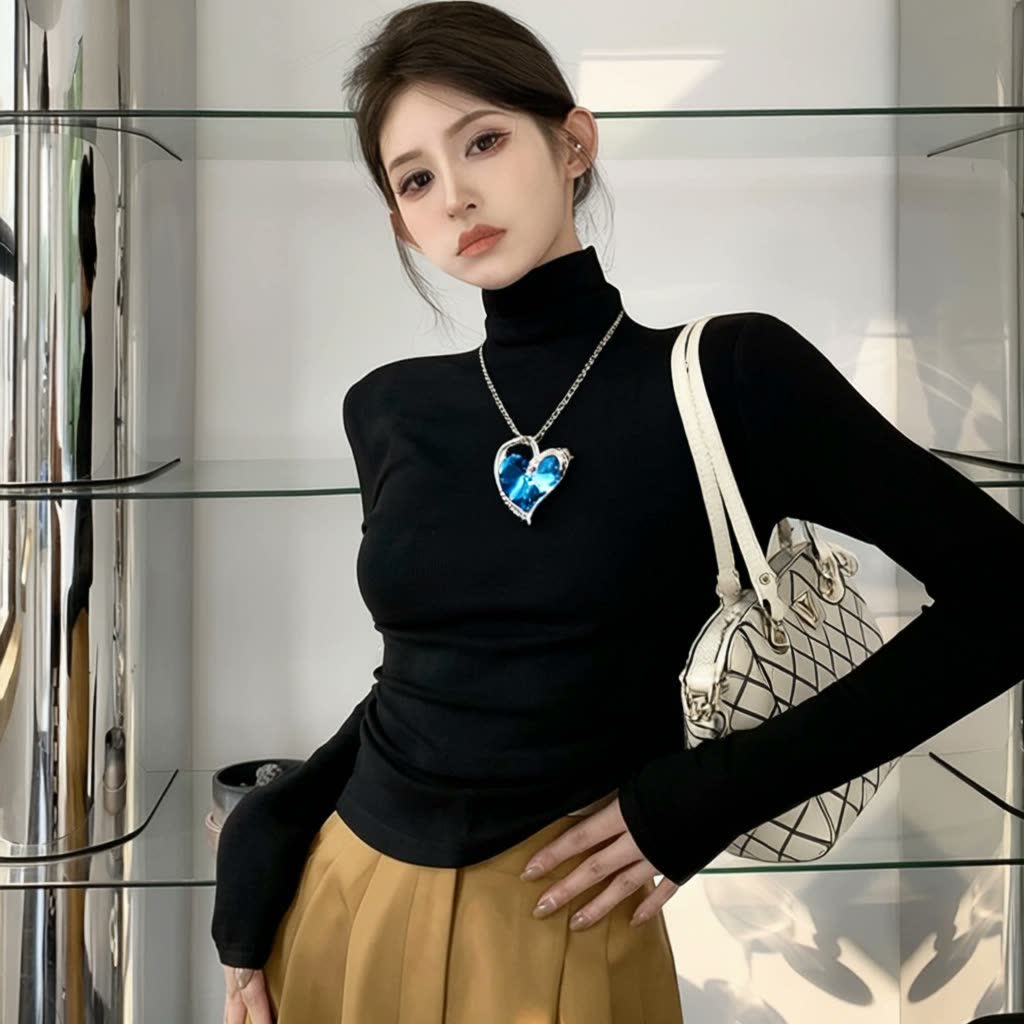
The girl in Figure 1 is wearing the necklace shown in Figure 2 and has the bag shown in Figure 3 slung over her left shoulder.
negative_prompt: blur, low qualitynum_images: 2seed: -1FAQ
Short answers.
How much does Qwen-Image Edit Plus cost?
Pricing starts at $0.032 per image at the base resolution; higher resolutions and longer durations cost more. Usage is billed per request from your balance — no subscription.
Does Qwen-Image Edit Plus run uncensored here?
No. Qwen applies its own content policy to this model regardless of where it is called from. For a route without an extra platform filter use Uncensored MiniMax H3; this page lists Qwen-Image Edit Plus for everything else it does well.
What does Qwen-Image Edit Plus take as input?
It is a image editing model. Supports multiple image inputs and outputs, allowing for precise modification of text within images, addition, deletion, or movement of objects, alteration of subject actions, transfer of image styles, and enhancement of image details.
How do I use it?
Enter an invite code to open Chat with the model loaded, or join the waitlist. We open seats in batches and track which models are requested most.
Related