
Qwen Image 3.0 Edit
Edits images from one to three reference images and a natural-language instruction, preserving key details such as facial features and identity while applying the requested changes
What it does
Qwen Image 3.0 Edit, in practice.
Qwen-Image 3.0 Edit is a high-fidelity image editing and image-to-image model. Supply one to three reference images plus an instruction to edit, restyle, or drive subject-consistent generation — preserving identity while changing clothing, scene, or composition. Built-in prompt expansion (DPE/APE), flexible resolution, and reproducible seeds support both rapid exploration and controlled iteration. > Invite-beta model for interface testing. Output does not represent final quality.
Product photo workspace
This page is a model reference. The workspace supports white backgrounds, scene changes, packaging text edits and model try-on using Qwen Image Edit.
Parameters
What you can set.
| Parameter | What it does | Options |
|---|---|---|
prompt | The editing instruction describing how to transform the reference image(s). | |
reference_image_urls | Reference image URLs for image editing. Provide one URL for single-image editing, or up to three URLs for multi-image reference / subject-driven editing. Accepts public HTTP(S) URLs, OSS temporary URLs, or Base64 data URIs. Recommended 384– | |
size | Output resolution as width*height (e.g. 1440*1440). Omit to let the model pick a resolution automatically. Valid range: 512*512–1440*1440. | |
n | Number of images to generate. | default 1 |
negative_prompt | Describes content that should NOT appear in the generated image. | |
seed | Seed for reproducible generation, range [0, 2147483647]. Omit for a random seed. | |
prompt_extend | Enable intelligent prompt rewriting for richer results. | default True |
prompt_extend_mode | Prompt rewriting strategy. 'direct' (DPE) rewrites in a single pass; 'agent' (APE) uses an agentic rewrite pipeline. | direct |
Sample prompt
The prompt behind the sample.
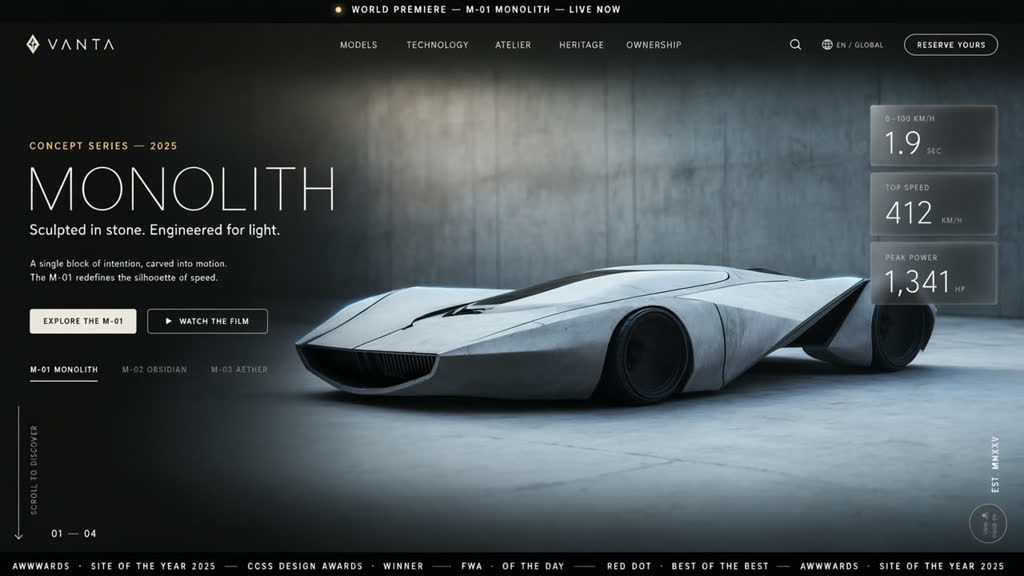
Create an award-winning automotive website concept based on the reference image. Transform its visual style into the homepage of a futuristic supercar brand. Showcase an ultra-realistic sports car with dramatic lighting, dynamic camera angles, immersive full-screen sections, smooth gradients, premium typography, floating UI cards, parallax-inspired composition, luxury branding, and cinematic storytelling. The design should evoke speed, precision, and innovation while maintaining a clean, minimal interface suitable for a world-class automotive brand. High-end web design, Awwwards quality, futur
size: 1280*720n: 1prompt_extend: Trueprompt_extend_mode: directwatermark: FAQ
Short answers.
How much does Qwen Image 3.0 Edit cost?
List price starts at $0.045 per image at the base resolution; higher resolutions and longer durations cost more. Per-use pricing, no subscription. Model prices are reference prices. The prompt workspace is free during the period shown on the homepage; no automatic charges.
Is Qwen Image 3.0 Edit good for e-commerce product photos?
It is an image-editing model, which is the core job here: background cleanup, relighting, inpainting, label or packaging text fixes and upscaling. Keep one instruction per pass so the product, logo and SKU details stay locked. Qwen's standard content policy applies.
What does Qwen Image 3.0 Edit take as input?
It is a image editing model. Edits images from one to three reference images and a natural-language instruction, preserving key details such as facial features and identity while applying the requested changes
How do I use Qwen Image 3.0 Edit?
Upload the image and describe the edit narrowly. Inpainting, restyle, upscale and background work all do better with one instruction per pass than with a paragraph of changes. Register or sign in to edit product photos with Qwen Image Edit. Other models on this page are catalog references.
Compare
Head-to-head, with real specs and samples.
Related