
MAI-Image-2.6 Text-to-image
Microsoft AI's flagship text-to-image model, generating photorealistic, design-ready images from natural language with markedly improved in-image text rendering, model-directed aspect ratio selection, and optional web-grounded context.
What it does
MAI-Image-2.6 Text-to-image, in practice.
MAI-Image-2.6 is Microsoft AI's flagship image model, built for high-quality generation and precise, controllable editing. This endpoint exposes its text-to-image path: you send a natural language prompt and receive a finished, design-ready image. MAI-Image-2.6 is a diffusion-based generative model that progressively refines an image from the prompt, which gives it strong text–image alignment even on long, densely specified instructions. Compared with the previous MAI-Image-2.5 generation, version 2.6 delivers noticeably stronger in-image text rendering, better portraits and 3D imagery, and more polished commercial and photorealistic output. It also adds two capabilities that were not availa
- Accurate text rendering — The headline improvement of this generation. Posters, packaging, signage, labels, UI mockups, and slide-style compositions come back with legible, correctly spelled, correctly kerned text. Microsoft measured a +91 Elo gain on text rendering over MAI-Image-2.5.
- Photorealistic synthesis — Realistic imagery with consistent lighting, materials, and scene structure, suitable for concept visualization and finished content.
- High-fidelity portraits — Expressive, natural-looking people with accurate facial structure, skin texture, and lighting.
- Product, branding, and commercial design — Tuned for product shots, marketing visuals, brand assets, and cinematic compositions rather than only artistic renders.
- Visual reasoning — Reasons across objects, scale, spatial positioning, lighting, and scene structure, so ambiguous prompts still resolve into coherent images.
- Web-grounded generation — Optionally retrieves current information from the web and uses it as extra context when interpreting the prompt. Useful for real-world entities, places, events, and anything that changes over time.
Run MAI-Image-2.6 Text-to-image
from $0.12/imageParameters
What you can set.
| Parameter | What it does | Options |
|---|---|---|
prompt | Text prompt describing the image to generate. Maximum context length: 32,000 tokens. | |
size | Image dimensions in width*height format (e.g., 1024*1024, 1536*1536, 2048*1152). Both width and height must be at least 768. The product of width × height must not exceed 2,359,296. Two special values are also supported: "default" uses the | default default |
enable_web_search | If enabled, the model will use web search to ground the generation with real-time information. This can improve accuracy for prompts involving real-world entities, places, or events. | default |
Sample prompt
The prompt behind the sample.
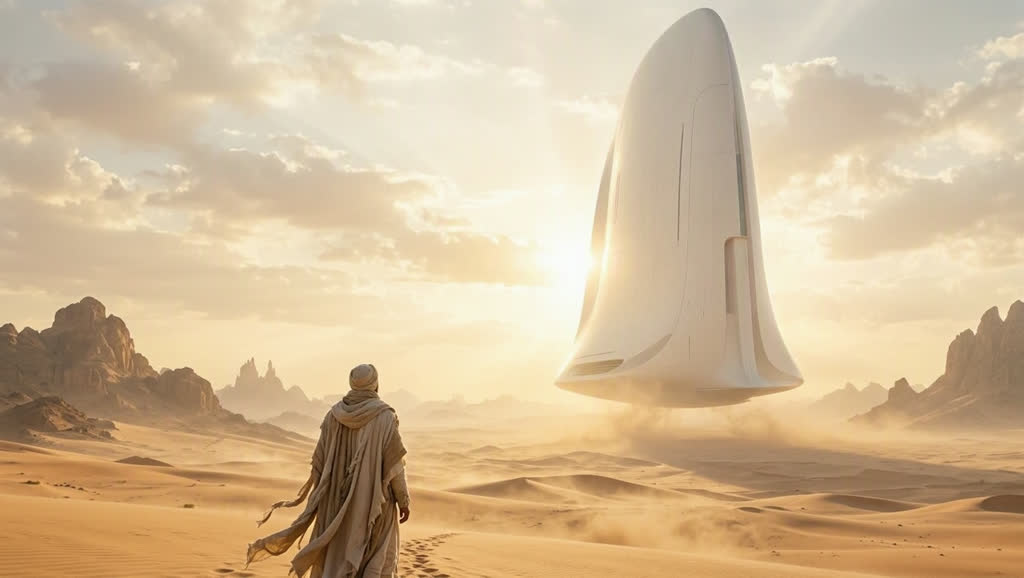
A lone traveler standing in a vast golden desert, looking up at a gigantic minimalist white spacecraft hovering silently above the dunes, soft sunlight illuminating the ship from behind, wind gently moving the traveler's robe, tiny human figure contrasted against the monumental spacecraft, mysterious but uplifting atmosphere, a journey about to begin, cinematic science fiction, epic scale, beautiful composition, photorealistic, atmospheric dust, 70mm cinematography, 8K.
size: 1368*768enable_web_search: enable_base64_output: enable_sync_mode: FAQ
Short answers.
How much does MAI-Image-2.6 Text-to-image cost?
Pricing starts at $0.12 per image at the base resolution; higher resolutions and longer durations cost more. Usage is billed per request from your balance — no subscription.
Does MAI-Image-2.6 Text-to-image run uncensored here?
No. Microsoft applies its own content policy to this model regardless of where it is called from. For a route without an extra platform filter use Uncensored MiniMax H3; this page lists MAI-Image-2.6 Text-to-image for everything else it does well.
What does MAI-Image-2.6 Text-to-image take as input?
It is a text-to-image model. Microsoft AI's flagship text-to-image model, generating photorealistic, design-ready images from natural language with markedly improved in-image text rendering, model-directed aspect ratio selection, and optional web-grounded context.
How do I use it?
Enter an invite code to open Chat with the model loaded, or join the waitlist. We open seats in batches and track which models are requested most.
Related