
GPT Image 2.5 Flare Edit
GPT Image 2.5 Flare Edit applies natural-language instructions to up to 16 reference images, with an optional mask, arbitrary resolutions up to 3840x2160, five quality tiers including xhigh and max, and transparent-background output.
What it does
GPT Image 2.5 Flare Edit, in practice.
GPT Image 2.5 Flare is OpenAI's upgraded GPT Image generation model, reached through the OpenAI Images API. Generation is asynchronous: submit the request, then poll for the final image URL.
- Up to 16 reference images in a single request, with an optional `mask`.
- Five quality tiers: `low`, `medium`, `high`, plus `xhigh` and `max`, which are new in gpt-image-2.5.
- Arbitrary resolutions up to 3840x2160, and fully supported transparent backgrounds.
- Long prompts: up to 32000 characters.
Run GPT Image 2.5 Flare Edit
from $0.0075/imageParameters
What you can set.
| Parameter | What it does | Options |
|---|---|---|
images | Up to 16 source images to edit. Each entry is a URL, Base64 data, or an asset reference (asset://<ASSET_ID>). | |
prompt | Text description of the desired image. Up to 32000 characters. | |
quality | Rendering quality tier. gpt-image-2.5 adds xhigh and max on top of low/medium/high. Higher tiers cost more per image. | auto low medium high xhigh max |
size | optional string or auto or 1024x1024 or 1536x1024 or 5 moreThe size ofthe generated images.For gpt-image-2.5 is supported as WIDTHxHEIGHT strings,for example 1536x864 . Width and height mustboth be divisible by 16 and the requested aspect r | auto 1024x768 768x1024 1024x1536 1536x1024 2048x2048 2048x1152 1152x2048 2560x1088 1088x2560 2880x2160 2160x2880 |
background | Background of the generated image. When using transparent, set the output format to png or webp. | auto opaque transparent |
output_format | Output image format. | png jpeg webp |
moderation | Content-moderation strictness. low applies less restrictive filtering. | auto low |
mask | Optional mask marking the region to edit. A URL, Base64 data, or an asset reference (asset://<ASSET_ID>). Transparent pixels mark the area the model should replace; it must match the first source image's dimensions. | |
n | Number of images to generate, 1 to 10. Each image is billed separately. | default 1 |
Sample prompt
The prompt behind the sample.
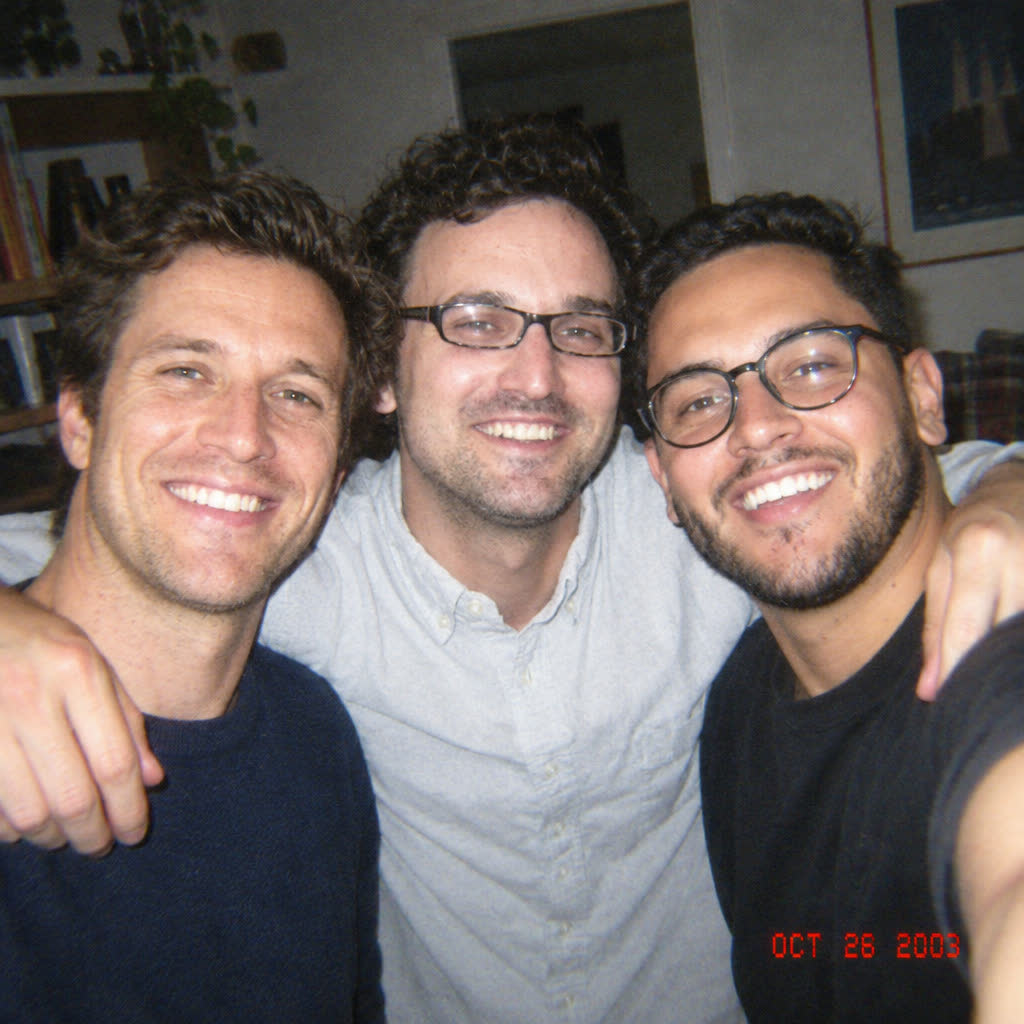
Three friends taking a casual selfie together at home, standing close with their arms naturally wrapped around each other, genuine smiles and relaxed expressions, spontaneous candid moment, warm and intimate friendship atmosphere. Shot with a vintage CCD digital camera, nostalgic early-2000s aesthetic, subtle flash, slightly overexposed highlights, soft skin tones, natural indoor lighting, authentic digital noise, subtle chromatic aberration, low-resolution CCD texture, slightly imperfect focus, realistic skin details, cozy home interior, everyday lifestyle photography, unposed composition, sn
quality: mediumsize: 1024x1024background: autooutput_format: pngmoderation: auton: 1FAQ
Short answers.
How much does GPT Image 2.5 Flare Edit cost?
Pricing starts at $0.0075 per image at the base resolution; higher resolutions and longer durations cost more. Usage is billed per request from your balance — no subscription.
Does GPT Image 2.5 Flare Edit run uncensored here?
No. OpenAI applies its own content policy to this model regardless of where it is called from. For a route without an extra platform filter use Uncensored MiniMax H3; this page lists GPT Image 2.5 Flare Edit for everything else it does well.
What does GPT Image 2.5 Flare Edit take as input?
It is a image editing model. GPT Image 2.5 Flare Edit applies natural-language instructions to up to 16 reference images, with an optional mask, arbitrary resolutions up to 3840x2160, five quality tiers including xhigh and max, and transparent-background output.
How do I use it?
Enter an invite code to open Chat with the model loaded, or join the waitlist. We open seats in batches and track which models are requested most.
Related