minimaxiStudio 註冊免費使用
商品修圖商業合規 · 100% 鎖定商品主體限時免費

Flux Kontext 場景鎖定

新的桌面場景,匹配的棚拍光線,商品零變形。

多數便宜換背景工具只是把摳圖貼在模糊底圖上。Flux Kontext 與 Qwen Image Edit 會重新計算光線方向、表面反射與地面陰影,同時把品牌 Logo 像素級鎖定。

全部電商工具

單價 採用下方高性價比模型,每image成本低至 $0.038 起。

工作台

在工作台上傳商品圖,可做白底主圖、換場景、包裝改字與服裝上模特。

不知道怎麼寫修圖指令?點此一鍵套用「白底圖 / 換場景 / 改字 / 模特換裝」模板

一鍵套用修圖模板

選你要做的效果,3 秒生成精準修圖指令

點選下方常用場景(純白底主圖、換背景打光、包裝改字、平鋪衣服上模特),自動鎖定商品外型與 Logo 不變形。

1. 選擇修圖任務
2. 拍攝視角
3. 背景與光線
組合好的修圖指令(可直接複製使用)
標準商品主圖正面視角,邊緣銳利。磨砂玻璃精華液瓶配金色滴管蓋,保持原有品牌字體與 Logo 100% 清晰不變,純白 #FFFFFF 背景 + 自然接觸陰影。

操作流程

三步出圖。

Upload your product still

A clean phone shot or cutout of your bottle, electronics, footwear, or home ware.

Pick surface and light direction

Specify marble, pale oak, brushed slate, or botanical sunlight.

Generate with SKU lock

Flux Kontext wraps ambient light and shadows around the product without altering its label.
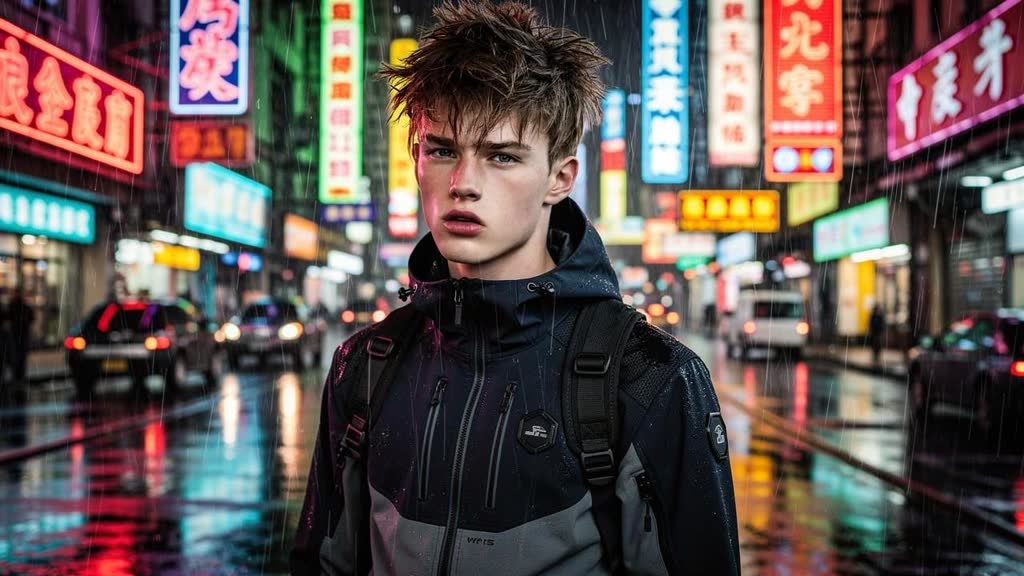
FLUX.2 Pro Edit sample output
來自 FLUX.2 Pro Edit 的真實生成樣例(公開透明單價)。 · prompt: “Please place the character on the rainy streets of Hong Kong at night, dressed in techwear-style clothing.”

你只需上傳

輸入素材。

  • Product photo or transparent cutout
  • Scene & lighting prompt (e.g. warm travertine stone podium, morning window light)
  • Target aspect ratio (1:1, 4:5, 9:16, 16:9)

你直接獲得

交付成片。

  • Relit commercial lifestyle product photo up to 4K
  • Preserved SKU geometry and brand typography

底層引擎

驅動此工具的底層 AI 模型。

公開透明的單張/每秒成本。結合 Qwen-Image-Edit 的中英文包裝改字能力與 Flux Kontext / Pro 的棚拍光影合成能力。

常見問題

賣家最關心的問題。

Will the AI distort my printed logo or bottle shape?

No. The SKU geometry and label region remain locked while the model synthesizes the surrounding surface, reflections, and shadows.

Which model is best for glass cosmetics vs electronics?

Flux 2 Pro Edit and Flux Kontext excel at specular metal and glass caustics; Qwen Image 3.0 Pro Edit is best when packaging text sits right near the edge.

Can I generate matching 1:1 and 9:16 assets for the same SKU?

Yes — run 1:1 for Amazon/Shopify product cards and 9:16 for TikTok Shop / Reels ads using the same lighting preset.

如何開始使用?需要付費嗎?

使用信箱和密碼註冊後即可使用。免費截止日期會顯示在首頁及工作台,無需信用卡,不自動扣款。

關聯工具

賣家常搭配使用的工具。

在工作台使用「商品換背景與自然打光」。

註冊或登入後,即可上傳、修改並儲存商品圖。

註冊免費使用 瀏覽模型價目