
Nano Banana 2 Lite Edit Developer
Google's fastest and most cost-efficient Nano Banana image model for editing, applying natural-language edits and multi-image composition to up to 14 reference images with low latency.
What it does
Nano Banana 2 Lite Edit Developer, in practice.
Nano Banana 2 Lite (Gemini 3.1 Flash-Lite Image, gemini-3.1-flash-lite-image) is Google's fastest and most cost-efficient image model in the Nano Banana family. This variant is driven by one or more input images plus a natural-language prompt, applying conversational edits and multi-image composition with the same low latency that defines the Lite tier. It shares the underlying model with the text-to-image variant — the difference is the input: you supply up to 14 reference images and describe the change you want, and the model edits, combines, or transforms them accordingly. It replaces the original Nano Banana (Gemini 2.5 Flash Image) with improved visual quality, stronger character consis
- Natural-language editing — Modify images by describing the change in plain words — no masking, layering, or manual tools required.
- Multi-image composition — Accepts up to 14 input images to blend subjects, transfer styles, or assemble scenes from multiple references.
- Strong character consistency — Preserves character identities and object fidelity across edits, so subjects stay recognizable through repeated changes.
- Legible in-image text — Renders and localizes readable text directly within edited images for quick captioning and design tweaks.
- World knowledge — Understands scene structure and real-world context to keep edits coherent and plausible.
- Fast and cost-efficient — The budget-friendly member of the Nano Banana family, built for high-volume editing at scale. (Editing has slightly higher latency than pure text-to-image generation.)
Product photo workspace
This page is a model reference. The workspace supports white backgrounds, scene changes, packaging text edits and model try-on using Qwen Image Edit.
Parameters
What you can set.
| Parameter | What it does | Options |
|---|---|---|
aspect_ratio | The aspect ratio of the generated media. | auto 1:1 3:2 2:3 3:4 4:3 4:5 5:4 9:16 16:9 21:9 4:1 |
images | List of URLs of input images for editing. The maximum number of images is 14. | |
prompt | The positive prompt for the generation. | |
resolution | The resolution of the output image. | 1k |
thinking_level | Controls the amount of internal reasoning the model performs before generating a response. Higher levels may improve quality on complex tasks but increase latency. | default high minimal |
seed | Random seed. Does not guarantee determinism but may improve repeatability. -1 means a random seed will be used. | default -1 |
top_p | Probability threshold for top-p sampling | default 0.95 |
temperature | Creativity allowed in the responses. Best results at default 1.0. Lower values may impact reasoning. | default 1 |
Sample prompt
The prompt behind the sample.
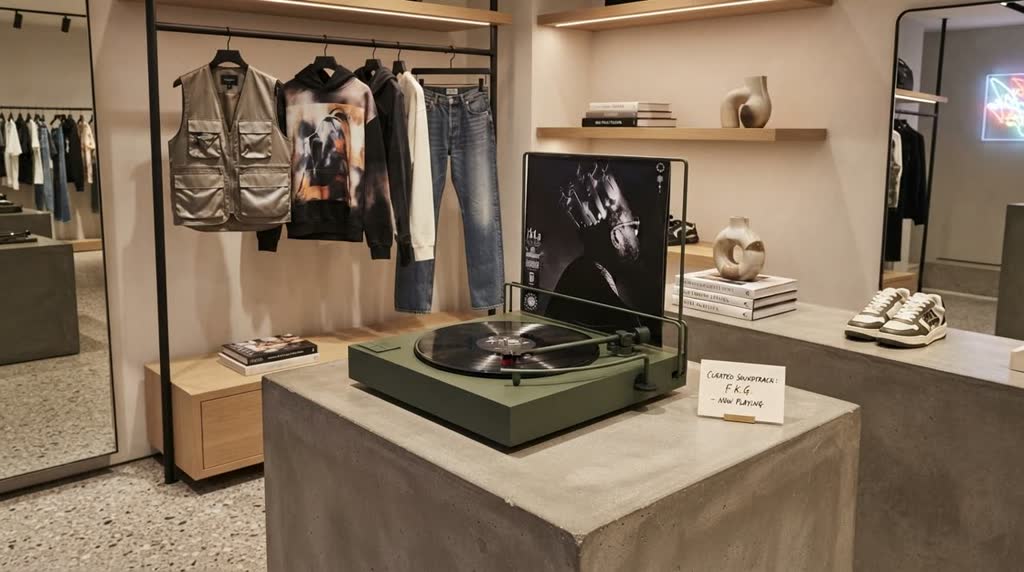
Based on the image content, place the vinyl record player in a trendy fashion store.
aspect_ratio: 16:9enable_base64_output: enable_sync_mode: resolution: 1kthinking_level: defaultFAQ
Short answers.
How much does Nano Banana 2 Lite Edit Developer cost?
List price starts at $0.042 per image at the base resolution; higher resolutions and longer durations cost more. Per-use pricing, no subscription. Model prices are reference prices. The prompt workspace is free during the period shown on the homepage; no automatic charges.
Is Nano Banana 2 Lite Edit Developer good for e-commerce product photos?
It is an image-editing model, which is the core job here: background cleanup, relighting, inpainting, label or packaging text fixes and upscaling. Keep one instruction per pass so the product, logo and SKU details stay locked. Google's standard content policy applies.
What does Nano Banana 2 Lite Edit Developer take as input?
It is a image editing model. Google's fastest and most cost-efficient Nano Banana image model for editing, applying natural-language edits and multi-image composition to up to 14 reference images with low latency.
How do I use Nano Banana 2 Lite Edit Developer?
Upload the image and describe the edit narrowly. Inpainting, restyle, upscale and background work all do better with one instruction per pass than with a paragraph of changes. Register or sign in to edit product photos with Qwen Image Edit. Other models on this page are catalog references.
Related