
Nano Banana 2 Reference to Image
Google's advanced AI-powered video-to-image generation model, designed to generate high-quality static images from video clips combined with text instructions.
What it does
Nano Banana 2 Reference to Image, in practice.
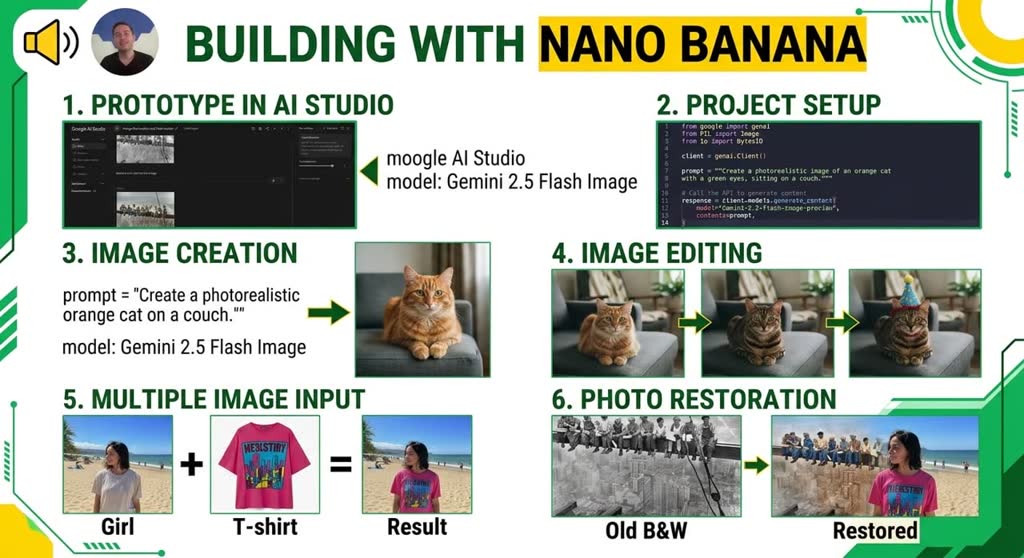
Nano Banana 2 Reference to Image (Gemini 3.1 Flash Image) is Google's advanced AI-powered video-to-image generation model, designed to generate high-quality static images from video clips combined with text instructions. Built on the same cutting-edge model as Nano Banana 2 Edit, it adds the ability to use video content as a rich reference source — extracting visual context, themes, and key frames to synthesize new images with precision and semantic awareness. This model is ideal for creating thumbnails, posters, promotional artwork, and scene summaries by leveraging the visual richness of existing video content alongside natural language guidance.
- Video as reference — Provide a video clip (HTTP URL or YouTube URL) and let the model extract its visual context to guide image generation.
- Multi-image reference — Optionally upload up to 10 additional reference images to complement the video input for complex compositions.
- Natural language control — Describe exactly what you want with a text prompt; the model understands context, themes, and relationships from both the video and text.
- Thinking levels — Choose how much internal reasoning the model applies — higher thinking levels improve quality on complex tasks.
- Media resolution control — Balance detail and token usage for input video frames with LOW, MEDIUM, or HIGH media resolution modes.
- Web & image search grounding — Optionally enable real-time web or image search to enrich generation with current information.
Product photo workspace
This page is a model reference. The workspace supports white backgrounds, scene changes, packaging text edits and model try-on using Qwen Image Edit.
Parameters
What you can set.
| Parameter | What it does | Options |
|---|---|---|
aspect_ratio | The aspect ratio of the generated media. | 1:1 3:2 2:3 3:4 4:3 4:5 5:4 9:16 16:9 21:9 |
enable_web_search | If enabled, the model will use web search to ground the generation with real-time information. | default |
enable_image_search | If enabled, the model will use image search to ground the generation with real-time information. | default |
images | List of URLs of input images for editing. The maximum number of images is 10. | |
output_format | The format of the output image. | default png jpeg |
prompt | The positive prompt for the generation. | |
resolution | The resolution of the output image. | 1k 2k 4k |
media_resolution | Controls how input media is processed. LOW reduces tokens per image/video, possibly losing detail but allowing longer videos in context. Supported values: HIGH, MEDIUM, LOW. | default low medium high |
thinking_level | Controls the amount of internal reasoning the model performs before generating a response. Higher levels may improve quality on complex tasks but increase latency. | default high minimal |
video_clips | Source video clips to use as references for generation. Supports 1 video clip. | |
seed | Random seed. Does not guarantee determinism but may improve repeatability. -1 means a random seed will be used. | default -1 |
top_p | Probability threshold for top-p sampling | default 0.95 |
temperature | Creativity allowed in the responses. Best results at default 1.0. Lower values may impact reasoning. | default 1 |
Sample prompt
The prompt behind the sample.
Generate a poster image that captures the key themes of this video.
enable_base64_output: enable_sync_mode: enable_web_search: enable_image_search: output_format: defaultresolution: 1kmedia_resolution: defaultthinking_level: defaultFAQ
Short answers.
How much does Nano Banana 2 Reference to Image cost?
List price starts at $0.12 per image at the base resolution; higher resolutions and longer durations cost more. Per-use pricing, no subscription. Model prices are reference prices. The prompt workspace is free during the period shown on the homepage; no automatic charges.
Is Nano Banana 2 Reference to Image good for e-commerce product photos?
It is an image-editing model, which is the core job here: background cleanup, relighting, inpainting, label or packaging text fixes and upscaling. Keep one instruction per pass so the product, logo and SKU details stay locked. Google's standard content policy applies.
What does Nano Banana 2 Reference to Image take as input?
It is a image editing model. Google's advanced AI-powered video-to-image generation model, designed to generate high-quality static images from video clips combined with text instructions.
How do I use Nano Banana 2 Reference to Image?
Upload the image and describe the edit narrowly. Inpainting, restyle, upscale and background work all do better with one instruction per pass than with a paragraph of changes. Register or sign in to edit product photos with Qwen Image Edit. Other models on this page are catalog references.
Related