
GPT Image 2 Developer Edit
GPT Image 2 Developer Edit applies natural-language instructions to one or more reference images, with common aspect ratios and 1k, 2k, or supported 4k output tiers.
What it does
GPT Image 2 Developer Edit, in practice.
GPT Image 2 Edit is a cost-efficient image editing model powered by OpenAI's GPT image technology. It enables users to refine, modify, or transform existing images using natural language instructions, while maintaining the original style, composition, and visual integrity.
Product photo workspace
This page is a model reference. The workspace supports white backgrounds, scene changes, packaging text edits and model try-on using Qwen Image Edit.
Parameters
What you can set.
| Parameter | What it does | Options |
|---|---|---|
images | The images to edit. | |
output_format | The format of the output image. | jpeg png |
prompt | The positive prompt for the generation. | |
quality | The quality of the generated image. | low medium high |
size | optional string or auto or 1024x1024 or 1536x1024 or 5 moreThe size ofthe generated images.For gpt-image-2 and gpt-image-2-2026-04-21,arbitraryresolutions are supported as WIDTHxHEIGHT strings,for example 1536x864 . Width and height mustbot | 1024x1024 1024x768 768x1024 1024x1536 1536x1024 2048x2048 2048x1152 1152x2048 2560x1088 1088x2560 2880x2160 2160x2880 |
moderation | Whether to enable content moderation. If enabled, the system will check the input prompt for potentially harmful content and reject requests that violate content policies. This property is only available through the API. | default low |
Sample prompt
The prompt behind the sample.
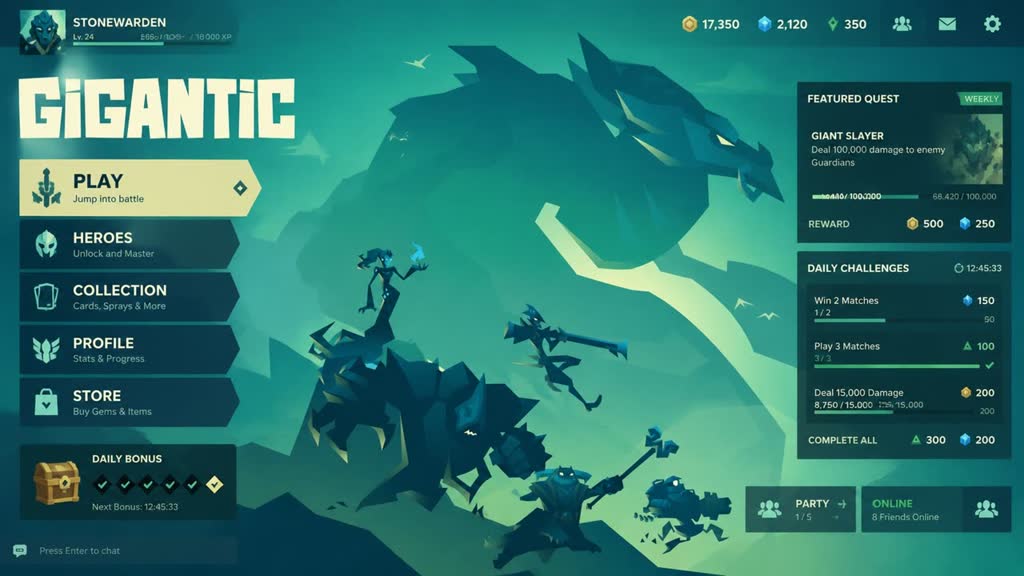
Generate a game GUI interface based on the style of the images.
size: 2048x1152enable_base64_output: enable_sync_mode: output_format: jpegquality: mediummoderation: lowFAQ
Short answers.
How much does GPT Image 2 Developer Edit cost?
List price starts at $0.0075 per image at the base resolution; higher resolutions and longer durations cost more. Per-use pricing, no subscription. Model prices are reference prices. The prompt workspace is free during the period shown on the homepage; no automatic charges.
Is GPT Image 2 Developer Edit good for e-commerce product photos?
It is an image-editing model, which is the core job here: background cleanup, relighting, inpainting, label or packaging text fixes and upscaling. Keep one instruction per pass so the product, logo and SKU details stay locked. Community's standard content policy applies.
What does GPT Image 2 Developer Edit take as input?
It is a image editing model. GPT Image 2 Developer Edit applies natural-language instructions to one or more reference images, with common aspect ratios and 1k, 2k, or supported 4k output tiers.
How do I use GPT Image 2 Developer Edit?
Upload the image and describe the edit narrowly. Inpainting, restyle, upscale and background work all do better with one instruction per pass than with a paragraph of changes. Register or sign in to edit product photos with Qwen Image Edit. Other models on this page are catalog references.
Related