
Wan-2.5 Image Edit
Open and Advanced Large-Scale Image Generative Models.
What it does
Wan-2.5 Image Edit, in practice.
Alibaba WAN 2.5 Image Edit enables you to upload an existing visual and specify the desired adjustments. The model preserves layout and subject structure while implementing high-quality updates based on natural language.
- Structure-preserving edits: Make lighting, color, or object changes without breaking composition.
- Text-guided styling: Reimagine materials, moods, or art styles with concise prompts.
- Prompt expansion on demand: Enable automatic prompt enrichment when you need extra detail.
- Flexible output sizes: Pick the resolution that best matches your downstream workflow.
- Marketing and design teams refining campaign visuals.
- E-commerce sellers upgrading product imagery.
Product photo workspace
This page is a model reference. The workspace supports white backgrounds, scene changes, packaging text edits and model try-on using Qwen Image Edit.
Parameters
What you can set.
| Parameter | What it does | Options |
|---|---|---|
images | List of URLs of input images for editing. The maximum number of images is 3. Image formats: JPEG, JPG, PNG (alpha channel not supported), BMP, WEBP. Image resolution: Image width and height both range from [384, 5000] pixels. File size: No | |
prompt | The positive prompt for the generation. | |
negative_prompt | The negative prompt for the generation. | |
seed | The random seed to use for the generation. -1 means a random seed will be used. | default -1 |
size | The size of the generated image in pixels (width*height). | 576*1344 720*1280 720*1680 768*1024 800*1200 816*1904 936*1664 960*1280 960*1440 1024*768 1024*1024 1040*1560 |
enable_prompt_expansion | If set to true, the prompt optimizer will be enabled. | default True |
Sample prompt
The prompt behind the sample.
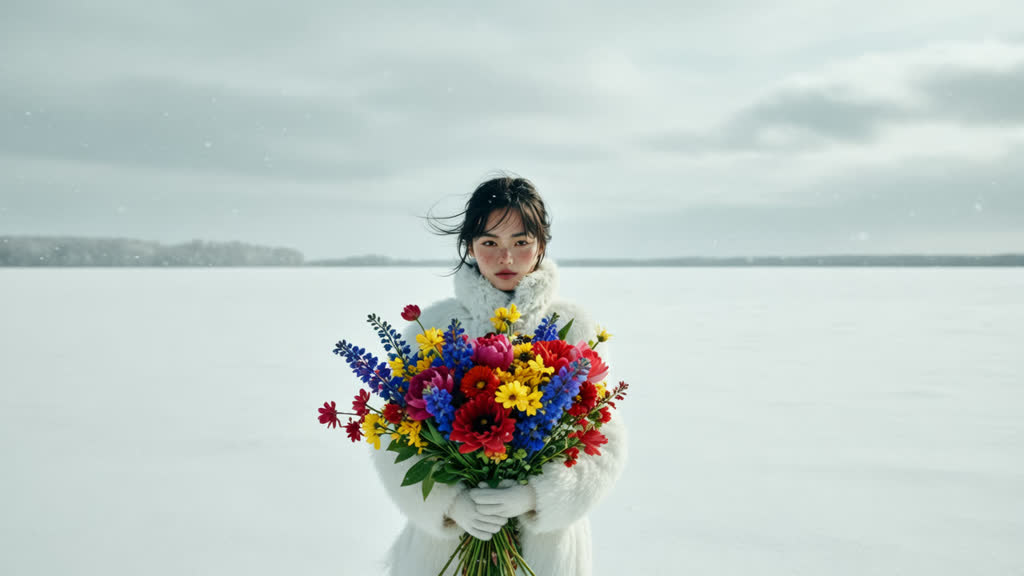
A cinematic wide shot of a solitary girl holding a vibrant bouquet of flowers, standing in the middle of an endless snowfield. The scene is minimalistic and poetic, with soft diffused lighting under a cloudy winter sky. Snow particles drifting in the air, subtle wind movement in her hair and coat. Strong visual contrast between the colorful bouquet and the monochrome white landscape. Ultra-realistic, high resolution, fashion editorial style, dramatic composition, 35mm lens, shallow depth of field.
seed: -1size: 1280*720enable_prompt_expansion: TrueFAQ
Short answers.
How much does Wan-2.5 Image Edit cost?
List price starts at $0.032 per image at the base resolution; higher resolutions and longer durations cost more. Per-use pricing, no subscription. Model prices are reference prices. The prompt workspace is free during the period shown on the homepage; no automatic charges.
Is Wan-2.5 Image Edit good for e-commerce product photos?
It is an image-editing model, which is the core job here: background cleanup, relighting, inpainting, label or packaging text fixes and upscaling. Keep one instruction per pass so the product, logo and SKU details stay locked. Qwen's standard content policy applies.
What does Wan-2.5 Image Edit take as input?
It is a image editing model. Open and Advanced Large-Scale Image Generative Models.
How do I use Wan-2.5 Image Edit?
Upload the image and describe the edit narrowly. Inpainting, restyle, upscale and background work all do better with one instruction per pass than with a paragraph of changes. Register or sign in to edit product photos with Qwen Image Edit. Other models on this page are catalog references.
Related