minimaxiStudio 新規登録
商品画像商用安全 · 商品ディテール保持期間限定無料

Exact Framing & Pose Lock

Match the exact catalog pose across every SKU.

Standardized category pages convert better when every jacket, dress, or handbag is framed at the exact same angle. Upload a pose or framing template and apply it consistently across your entire seasonal catalog.

すべてのツール

料金 下記最安モデルで 1image あたり $0.032 から。

搭載AIモデル
Qwen-Image Edit Plus, Nano Banana 2 Reference to Image
API参考単価
下記最安モデルで 1image あたり $0.032 から。
主な出力形式
Catalog image locked to the exact reference pose and angle
SKU固定・プライバシー
商品形状・ロゴ100%保持 · 学習利用なし

スタジオ

ワークスペースで画像をアップロードし、背景や文字、モデル着用画像を編集できます。

プロンプトの書き方に迷ったら?ワンクリックで白背景・背景合成・文字修正テンプレートを挿入

かんたん指示テンプレート

やりたい作業を選ぶだけで、最適な指示文を作成

「白背景」「シーン合成」「パッケージ文字修正」「モデル試着」から選ぶだけで、商品の形やロゴを崩さない指示文が完成します。

1. やりたい作業を選ぶ
2. アングル
3. 背景・ライト
完成した指示文(そのままコピーして使えます)
正面のメイン商品アングル、輪郭くっきり。ゴールドのスポイト付きガラス製美容液ボトル。ブランドのロゴとラベル文字は100%そのまま維持する,純白 #FFFFFF 背景+柔らかな接地影。

使い方

3つのステップ。

Upload the angle template

A mannequin shot or standard lookbook pose.

Attach your SKU or model

Drop the garment or synthetic model reference.

Render uniform catalog cards

Keep camera height and body posture identical across all variants.
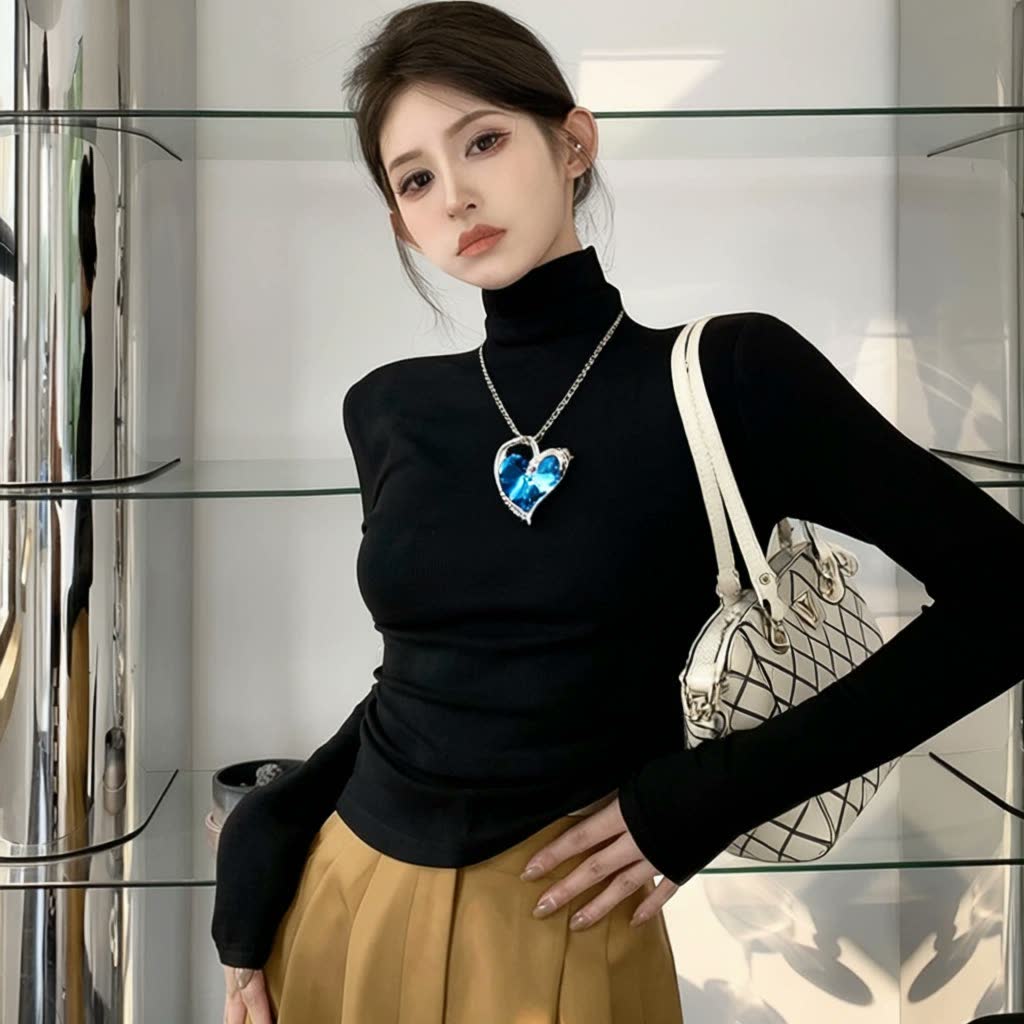
Qwen-Image Edit Plus sample output
Qwen-Image Edit Plus の実際の出力サンプル(1枚・1秒単位の明朗価格)。 · prompt: “The girl in Figure 1 is wearing the necklace shown in Figure 2 and has the bag shown in Figure 3 slung over her left shoulder.”

入力データ

アップロードするもの。

  • Pose or angle reference image (mannequin, sketch, or catalog shot)
  • Product / garment reference
  • Studio lighting description

出力データ

書き出されるもの。

  • Catalog image locked to the exact reference pose and angle

採用モデル

このツールを駆動するAIモデル。

1枚あたり・1秒あたりの明朗会計。文字修正に強い Qwen Image Edit と、光と質感に強い Flux Kontext / Pro を適材適所で組み合わせます。

よくある質問

Q&A。

Does the person from the pose reference appear in the final output?

No — only the geometric posture and camera framing are extracted; the output uses your synthetic brand model and garment.

Can I use a ghost mannequin photo as the reference?

Yes, mannequin and flat-lay references work cleanly to establish torso angle and sleeve drape.

Can the output be animated into a short lookbook clip?

Yes — send the finished still directly to Hero Photo to Product Video (/tools/product-video/).

利用方法と料金は?

メールアドレスとパスワードで登録して利用できます。無料期間はホームとワークスペースに表示されます。カード登録や自動課金はありません。

MiniMax H3 無検閲プロンプト・ポーズ指定・AIショートドラマをお探しですか? カメラワーク・LoRA・ローカル ComfyUI/GGUF 解説付きの「MiniMax H3 無検閲プロンプト集」や、AIショートドラマ本編(Huangguo Drama / ReelShorts)はこちら。
H3 無検閲プロンプト集を見る → AIショートドラマ本編を見る → ReelShorts を見る →

関連ツール

よく併用されるECツール。

Pose & Mannequin Angle Control をスタジオで実行。

登録またはログインして編集プロンプトを作成・保存できます。

新規登録 モデル一覧