minimaxiStudio 註冊免費使用
商品修圖商業合規 · 100% 鎖定商品主體限時免費

Exact Framing & Pose Lock

Match the exact catalog pose across every SKU.

Standardized category pages convert better when every jacket, dress, or handbag is framed at the exact same angle. Upload a pose or framing template and apply it consistently across your entire seasonal catalog.

全部電商工具

單價 採用下方高性價比模型,每image成本低至 $0.032 起。

核心 AI 模型
Qwen-Image Edit Plus, Nano Banana 2 Reference to Image
上游 API 參考單價
採用下方高性價比模型,每image成本低至 $0.032 起。
標準輸出規格
Catalog image locked to the exact reference pose and angle
商品鎖定與隱私
100% 鎖定商品外觀與 Logo · 原圖不用於訓練

工作台

在工作台規劃白底主圖、換場景、包裝改字與服裝上模特的結構化修圖方案並儲存。

不知道怎麼寫修圖指令?點此一鍵套用「白底圖 / 換場景 / 改字 / 模特換裝」模板

一鍵套用修圖模板

選你要做的效果,3 秒生成精準修圖指令

點選下方常用場景(純白底主圖、換背景打光、包裝改字、平鋪衣服上模特),自動鎖定商品外型與 Logo 不變形。

1. 選擇修圖任務
2. 拍攝視角
3. 背景與光線
組合好的修圖指令(可直接複製使用)
標準商品主圖正面視角,邊緣銳利。磨砂玻璃精華液瓶配金色滴管蓋,保持原有品牌字體與 Logo 100% 清晰不變,純白 #FFFFFF 背景 + 自然接觸陰影。

操作流程

三步出圖。

Upload the angle template

A mannequin shot or standard lookbook pose.

Attach your SKU or model

Drop the garment or synthetic model reference.

Render uniform catalog cards

Keep camera height and body posture identical across all variants.
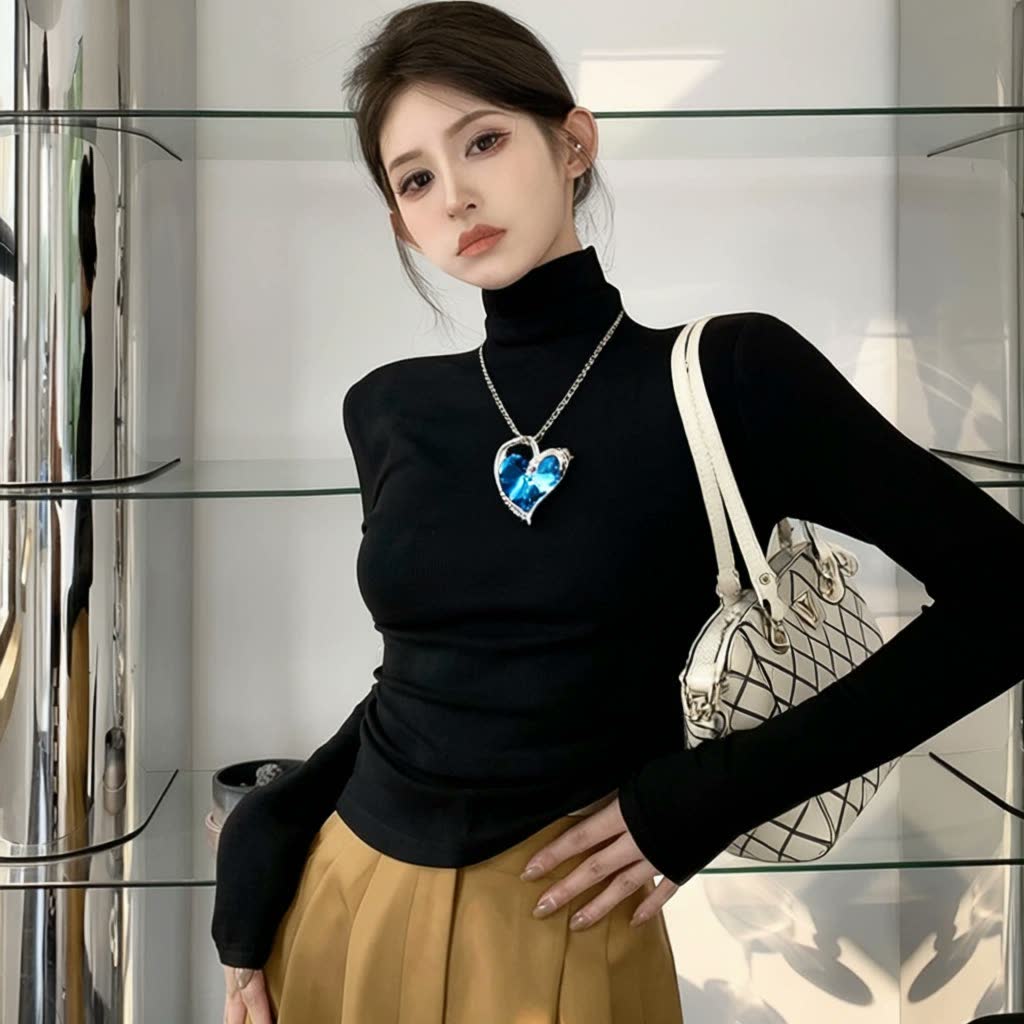
Qwen-Image Edit Plus sample output
來自 Qwen-Image Edit Plus 的真實生成樣例(公開透明單價)。 · prompt: “The girl in Figure 1 is wearing the necklace shown in Figure 2 and has the bag shown in Figure 3 slung over her left shoulder.”

你只需上傳

輸入素材。

  • Pose or angle reference image (mannequin, sketch, or catalog shot)
  • Product / garment reference
  • Studio lighting description

你直接獲得

交付成片。

  • Catalog image locked to the exact reference pose and angle

底層引擎

驅動此工具的底層 AI 模型。

公開透明的單張/每秒成本。結合 Qwen-Image-Edit 的中英文包裝改字能力與 Flux Kontext / Pro 的棚拍光影合成能力。

常見問題

賣家最關心的問題。

Does the person from the pose reference appear in the final output?

No — only the geometric posture and camera framing are extracted; the output uses your synthetic brand model and garment.

Can I use a ghost mannequin photo as the reference?

Yes, mannequin and flat-lay references work cleanly to establish torso angle and sleeve drape.

Can the output be animated into a short lookbook clip?

Yes — send the finished still directly to Hero Photo to Product Video (/tools/product-video/).

如何開始使用?需要付費嗎?

使用信箱和密碼註冊後即可使用。免費截止日期會顯示在首頁及工作台,無需信用卡,不自動扣款。

正在找 MiniMax H3 成人/短劇視覺提示詞、姿態控制或無審查模型教學? 查看完整的《MiniMax H3 成人提示詞與無審查模型教學(2026)》(含 30 秒分鏡公式與 ComfyUI/GGUF 本地工作流),或直接前往黃果短劇觀看 AI 短劇成片。
打開 H3 成人/短劇提示詞教學 → 觀看黃果 AI 短劇全集 → ReelShorts 海外短劇 →

關聯工具

賣家常搭配使用的工具。

在工作台使用「人台與模特姿勢角度控制」。

註冊或登入後即可免費規劃並儲存修圖提示詞方案(無自動扣款;分鏡與影片渲染可前往 huangguo.design/studio)。

註冊免費使用 瀏覽模型價目